

Agent nodes and the Agent Worker
An APL agent node represents probabilistic work — a model call. It never
runs inside the engine: it compiles to a durable external task on the
abada:agent topic, claimed and completed through the versioned
abada.agent/v1 profile. The engine records each attempt and advances the
workflow only when the worker reports completion or failure through a normal
command.
sequenceDiagram
    participant E as Engine
    participant DB as PostgreSQL
    participant W as Agent Worker (abada-agent-worker)
    participant M as LLM provider

    E->>DB: instance reaches agent node, writes external task
    W->>E: fetch-and-lock abada:agent
    E->>DB: lock task and extend lease (heartbeat loop)
    W->>M: model call (outside any workflow transaction)
    M-->>W: structured output (+ _confidence)
    W->>E: complete with attempt metadata
    E->>DB: merge variables, write history, advance atomically
Running the first-party worker
Section titled “Running the first-party worker”The development profile starts the abada-agent-worker service
automatically — no activation flag or manual provisioning. On first startup
the launcher generates an OIDC client secret, provisions Keycloak and the
engine, and registers the worker’s global abada:agent capability. Use
--no-agent only for core-stack diagnostics.
Before real agent tasks can complete, add a model provider and its key in Studio → Settings → AI Providers, and pick the Default model at the top (used by Insight, authoring and new agent nodes). Each provider shows where its key comes from: saved in Studio, or from the server’s environment. Test & save makes one short call first and saves nothing if the provider does not answer. Each provider then lists the models its key can use (read again once a day); those models are offered in the designer and allowed for agent nodes, so a new model works the day the provider publishes it. Providers: Google Gemini, OpenAI, Anthropic, DeepSeek, OpenRouter or any OpenAI-compatible gateway. Keys are stored encrypted in the database and never shown again; the worker receives them from the engine, so nothing in the worker’s configuration changes. The same providers serve Insight and APL authoring.
Each agent node’s model goes to the provider whose model prefix matches it
(gemini… to Gemini, claude… to Anthropic, * for a catch-all gateway).
If no provider serves a node’s model, Studio and the engine refuse to start
the process and name the model.
On a developer machine you can instead put a key in the untracked .env.dev;
a key saved in Studio always wins:
ABADA_LLM_GEMINI_API_KEY=...Tools and limits
Section titled “Tools and limits”The operator decides what a worker may reach; the project decides which tools exist and how dangerous they are; the engine enforces both.
- Models.
ABADA_AGENT_ALLOWED_MODELS(comma-separated) is the operator allow-list. Anagentnode naming a model outside it fails at deployment or authoring validation — not at first execution. Default:gemini-3.6-flash,gemini-3.7-flash,gemini-3.8-flash,deepseek/deepseek-v4-flash,gpt-5-mini. - Tool servers. Tools are declared per project as tool server resources
(MCP over streamable HTTP), each with a policy:
read,writeorapproval_required. A node binds tools as<server>/<tool>and may only tighten their policy; the bindings are frozen with the definition version.ABADA_AGENT_ALLOWED_TOOLSlists the tool servers this worker may reach: a node’scrm/get_customerruns only whencrm(or the exact reference) is listed, so a deployment can never widen what the operator allowed. - The tool loop. An agent that binds tools talks to the model over several
turns and calls the tools it asks for, with the project’s tool credential.
Every call is journaled with the engine first, so a restarted worker
continues where it stopped without paying for a model turn twice or sending
a write twice. Tool results are capped at
ABADA_AGENT_MAX_TOOL_RESULT_BYTES(64 KiB) and each MCP request atABADA_AGENT_TOOL_TIMEOUT_MS(30 s). - Approvals. An
approval_requiredcall pauses the agent until a person approves the exact call in the Task Inbox (see Approving an agent’s tool call); meanwhile the worker holds no lease and spends nothing. - Limits and cost.
max_turns,max_tokens_totalandbudget_usdon the node bound the loop; reaching one ends the step throughon_errorwithAGENT_BUDGET_EXHAUSTED. Only model calls that answered count as turns, so a provider outage does not spend them. Cost is computed by the engine from the token counts and the price in effect (USD per million tokens, effective-dated): your price in Settings → Model Prices, else the public model catalog the engine reads daily, else the snapshot shipped with the release. A budget fails closed for a model no source prices.
See Tutorial: an agent that acts for all of this on one process.
What the engine keeps durable
Section titled “What the engine keeps durable”- Attempt metadata. Each completion and failure carries
model, provider, attempt number,durationMs, tools,resultVariable, apromptHash(never the prompt), token counts when the provider reports them, the achievedconfidenceagainst the node’sconfidence_threshold, andrequestedModelwhen a fallback model answered. It is stored on the external-task row and in activity history, and rendered in the instance view. - Resilience. Leases expire and re-acquire dead-worker work without
duplicate transitions; transient failures return tasks to the pool; retries
are seeded from the APL
max_attempts; suspension and cancellation reject late completion atomically. Technical failures consume a durable retry budget; with zero retries left the step takes itson_errorroute or opens aWORK_FAILEDincident. - Rate limits. HTTP 429/quota, 408, 5xx, timeouts and unreachable
providers make a model unavailable: the worker tries the node’s
fallback_modelsin order, and when none can run it defers the attempt (the provider’sRetry-After, then a growing delay capped at 15 minutes) without spendingmax_attempts. After 12 deferrals the next one counts as a failed attempt. Invalid output or low confidence never switch the model. - Idempotency. Completion and failure use task ID + lease + operation as the idempotency key, so re-sent reports deduplicate, a deferral of the same attempt is a new request, and a stored failure never shadows a later completion.
Observing the worker
Section titled “Observing the worker”Studio surfaces worker state per project in the operations view:
| State | Meaning |
|---|---|
| Online | Heartbeat current (every fetch-and-lock poll writes a debounced heartbeat) |
| Error | Last fetch-and-lock was rejected (durable incident row) |
| Offline | No recent heartbeat or lease |
The same view shows last heartbeat, last rejection and consecutive failures, backed by the worker-health API. On the instance canvas, the live inspector renders the agent attempt’s model, provider, latency, tools, confidence and threshold, token counts, and — after a fallback — the model it replaced:
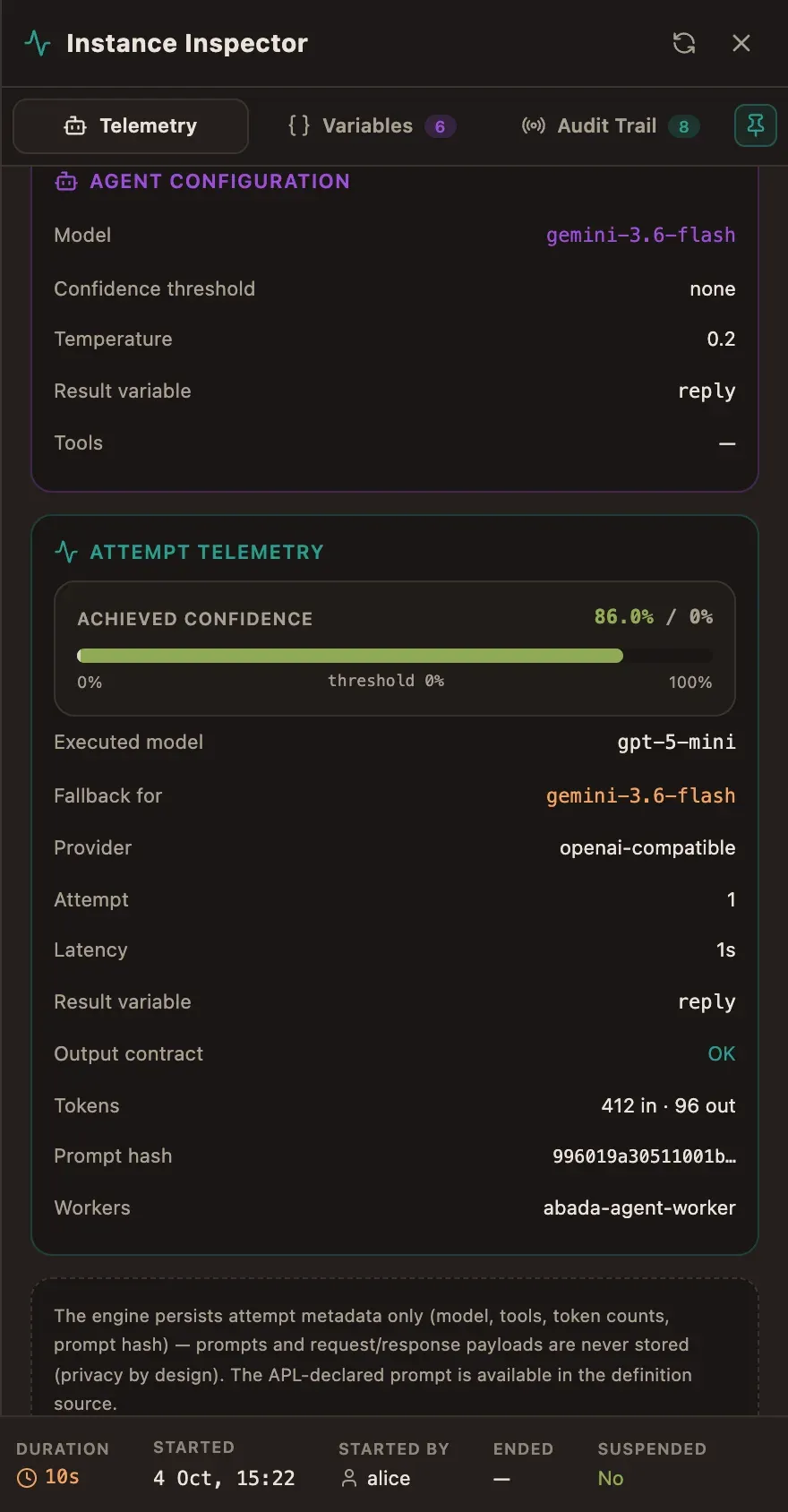
When an attempt fails, the inspector shows the error type and message with a Details button, and every Job failed event is clickable. The dialog shows the attempt, model, worker, job status and the full stack trace the worker reported, with Copy details for a bug report. The worker removes provider keys, tokens and credentials from the trace before sending it; only the latest attempt’s trace is kept.
What happens without a worker
Section titled “What happens without a worker”With no worker (or no LLM key), the instance pauses in ACTIVE at the agent
node. That is intentional: agent work must not advance engine state outside a
durable command. Start the worker (or configure its endpoint), and the run
resumes when the task is fetched and completed.
Securing the worker
Section titled “Securing the worker”For a secured engine, prefer OIDC client credentials
(ABADA_AGENT_OIDC_TOKEN_URL, ABADA_AGENT_OIDC_CLIENT_ID,
ABADA_AGENT_OIDC_CLIENT_SECRET) over a static ABADA_ENGINE_TOKEN. A
secured worker self-registers once at startup (PUT /v1/workers/me) and polls
project-agnostically; each locked task carries its owning projectId.
If the engine or identity provider is not reachable yet, or answers 5xx,
registration retries with backoff for up to ABADA_AGENT_STARTUP_RETRY_MS
(default five minutes); a rejected client secret (401/403) stops the worker
immediately.
Third-party workers that poll with an explicit projectId keep the legacy
per-project binding semantics and need an Owner-created binding per topic.
- Author an
agentnode in APL (see Author processes in native APL) or start the AI Lead Triage starter. - Deploy & Start the process with input variables.
- Watch the run pause at the agent node, then progress once the worker completes the task.
- Inspect attempt metadata on the instance canvas and worker health in Operations.