

Operate running processes
Everything a running process does is stored in PostgreSQL first and shown in Studio second. This page is the operator’s guide: where to look, what each state means, and how to unblock an instance.
The Operations view
Section titled “The Operations view”Operations lists every instance of the open project. The counters show what is running, what finished in the last day and what needs intervention (failed instances plus open incidents); the worker strip shows each agent worker and its last heartbeat, and the Incidents strip lists the open incidents.
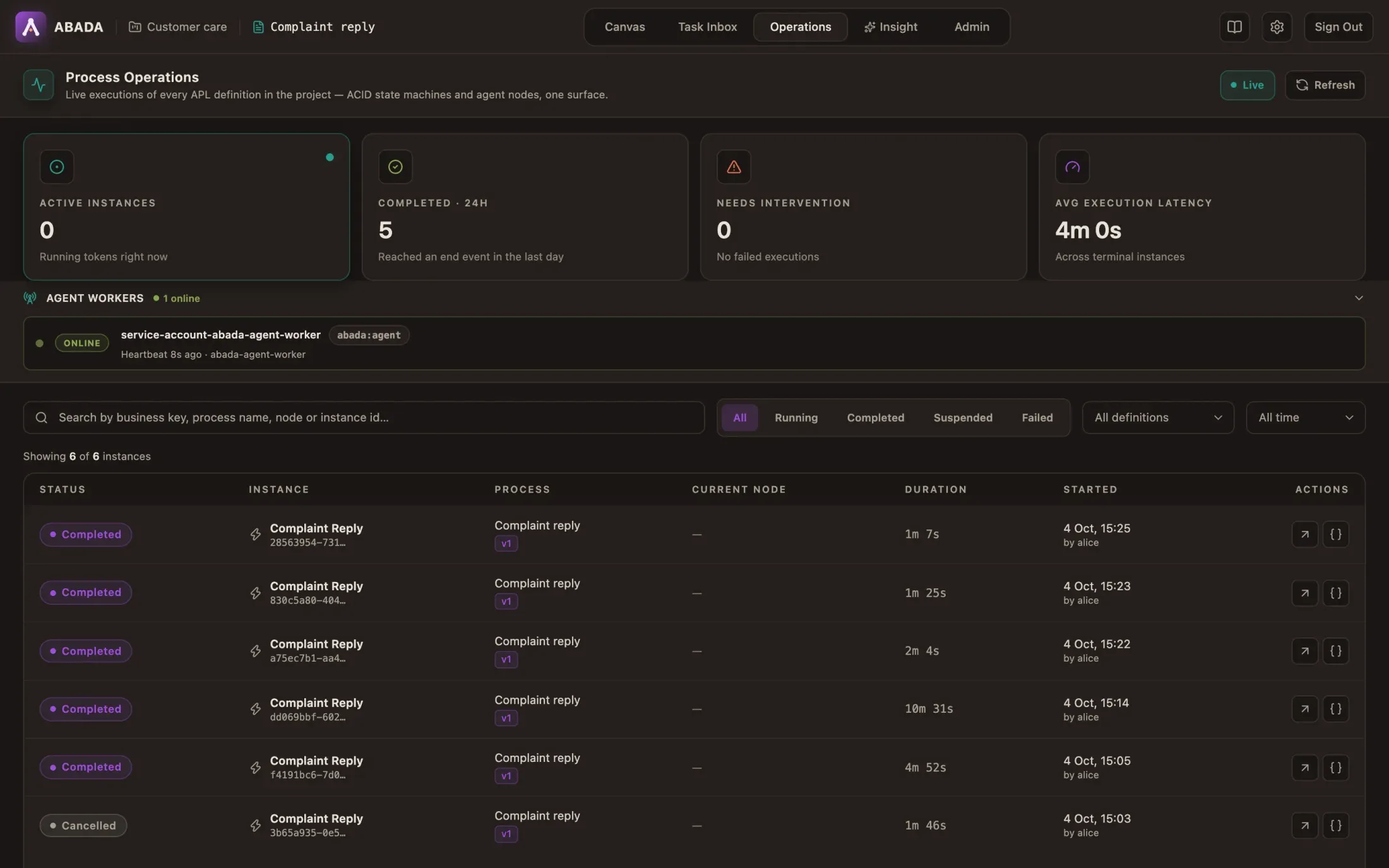
Filter by status (Running, Completed, Suspended, Failed), definition or time range, or search by instance id, process or node.
| Worker state | Meaning |
|---|---|
| Online | The worker polled recently |
| Error | Its last fetch was rejected (identity, permission or configuration) |
| Offline | No recent heartbeat |
One instance
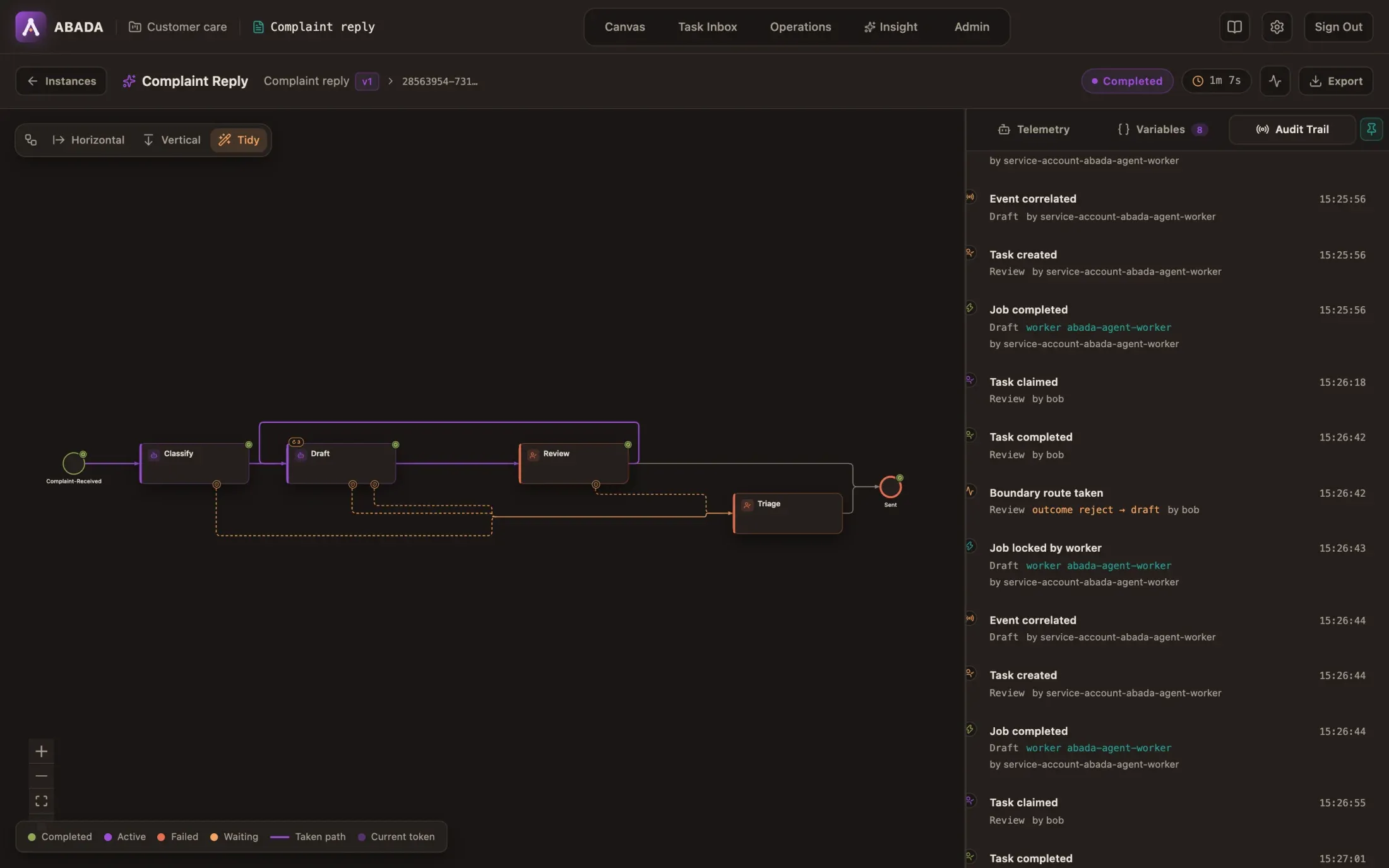
Section titled “One instance”Open an instance to see the path it took on the canvas and three tabs:
- Telemetry — for the selected step: its configuration and, for an agent, each attempt: model and provider, attempt number, latency, confidence against the threshold, the output contract result, token counts, prompt hash and worker. When a fallback model answered, Fallback for names the model it replaced.
- Variables — the current process variables.
- Audit Trail — every event in order, with its actor: process started,
jobs locked and completed by workers, tasks claimed and completed, and the
route a step took (
outcome reject → draft,timeout → triage). Click an event for its details.
The engine stores attempt metadata in history — never prompts, model responses
or provider keys. Journaled agent calls keep their prompts and results as the
project’s evidence policy allows (redacted by default, 30 days), encrypted, and
readable only by abada-evidence-reader members.
Live updates. While an instance runs, its page follows the project’s event stream and refreshes as soon as something happens; the header shows Live. When the stream is not available (a proxy that cuts long requests, for example) it shows Polling and refreshes every two seconds instead.
Agent steps. For an agent step, the telemetry tab lists every model call,
tool call and delegation in order, attempt by attempt: the tool’s policy
(read, write, approval required), the state (a write whose outcome is unknown
is highlighted; a proposed call shows who approved or rejected it, and when; a
delegation links to the process it started), tokens and cost, with totals.
Click a step to read its payloads as the evidence policy kept them; that needs
the abada-evidence-reader role and every read is recorded in the history.
Agent cost. The instance bar shows what its agent calls cost and how many tokens they used; the telemetry of an agent step lists each call with its cost. The engine computes cost from the price in effect: yours in Settings → Model Prices, else the public model catalog’s (the tab shows each model’s source). A call to a model no source prices shows unpriced: the real cost is higher than the total shown.
Called processes
Section titled “Called processes”An instance started by a call-process step shows Called by with the
chain of callers up to the root; an instance whose steps called other
processes lists them under Called processes with their status. Each one
opens its own instance page. The same tree is available from
GET /api/v1/projects/$PROJECT_ID/instances/$INSTANCE_ID/lineage. Cancelling
an instance cancels the processes it called that are still running.
Instance actions
Section titled “Instance actions”| Action | In Studio | Effect |
|---|---|---|
| Suspend / Resume | Instance header | A suspended instance accepts no completion; late worker reports are rejected and retried after resume |
| Cancel | Instance header | Ends the instance and retires all its open work (tasks, jobs, timers) in one transaction |
| Retry a failed job | Failed step in the inspector | Gives the job one more attempt and resolves its WORK_FAILED incident |
| Retry an incident | Incidents strip (Operations or the instance) | Restarts the stopped step; see Incidents |
The same actions exist under /api/v1/projects/{projectId}/instances/{instanceId}
(DELETE to cancel, PUT …/suspension) and
/api/v1/projects/{projectId}/jobs/{jobId}/retries.
Incidents
Section titled “Incidents”An incident stops one path of an instance until someone acts. The rest of the instance — other branches, timers — keeps going.
| Incident | Cause | Fix |
|---|---|---|
WORK_FAILED |
A step’s last attempt failed and the step has no on_error |
Fix the cause (provider key, quota, worker), then retry |
LOOP_EXHAUSTED |
A loop reached max_iterations and has no on_exhausted |
Retry (the step starts a fresh pass) or cancel |
MISSING_CORRELATION_KEY |
A message wait has no correlationKey value |
Set the variable, then retry |
CHILD_FAILED |
A called process failed, was cancelled, or could not start (inputs, depth) and the call step has no on_error |
Look at the child (it is linked from the instance), fix the cause, then retry: a new child starts |
TOOL_OUTCOME_UNKNOWN |
An agent write was interrupted and its tool server takes no idempotency key, so it may or may not have happened | Check the target system, then confirm: It happened or It did not happen. The agent resumes with that fact; the write is never re-sent blindly |
In Studio
Section titled “In Studio”The Incidents strip in Operations lists the open incidents of the project, newest first: kind, step, instance, when it opened and the engine’s message. An instance’s page shows the same strip with only its own incidents, and only while it has one.
Retry restarts the step: failed work is reopened with a fresh attempt budget, an exhausted loop starts a fresh pass, a message wait is armed again. The incident leaves the list once the engine has resolved it; if the engine refuses the retry, its reason is shown on the incident.
Retry is an Operator or Owner action on the project. Other members see the incidents without the actions; the engine enforces the same rule on the API.
Through the API
Section titled “Through the API”List and retry them through the project API:
# Open incidents of a projectcurl "$ABADA_URL/api/v1/projects/$PROJECT_ID/incidents" -H "Authorization: Bearer $TOKEN"
# Retry onecurl -X POST "$ABADA_URL/api/v1/projects/$PROJECT_ID/incidents/$INCIDENT_ID/retry" \  -H "Authorization: Bearer $TOKEN"
A TOOL_OUTCOME_UNKNOWN incident needs the confirmed outcome in the body:
curl -X POST "$ABADA_URL/api/v1/projects/$PROJECT_ID/incidents/$INCIDENT_ID/retry" \ -H "Authorization: Bearer $TOKEN" -H "Content-Type: application/json" \ -d '{"toolOutcome":"NOT_PERFORMED"}'Retry an agent step on another model
Section titled “Retry an agent step on another model”When a provider is down or out of quota, an operator can retry a failed agent
step on another allowed model, for that task only; the deployed definition is
unchanged. The reason is required and recorded with the old and new model and
the operator in the history (INCIDENT_RETRIED).
In Studio, a WORK_FAILED incident on an agent step offers Retry on another
model: pick a model from the engine’s allow-list (the step’s current model
is left out), give the reason, and confirm. The option is not offered for
other incidents or steps, which the engine would reject.
Through the API:
curl -X POST "$ABADA_URL/api/v1/projects/$PROJECT_ID/incidents/$INCIDENT_ID/retry" \ -H "Authorization: Bearer $TOKEN" -H "Content-Type: application/json" \ -d '{"model": "gemini-3.7-flash", "reason": "provider quota exhausted"}'Only project Operators and Owners may retry.
Waiting is not failing
Section titled “Waiting is not failing”Some states look stuck but are working as designed:
| You see | What it means |
|---|---|
| An agent step stays active, no attempt yet | No worker is online, or no AI provider serves the model. Nothing is lost; the step runs when a worker can take it |
EXTERNAL_TASK_DEFERRED in the history |
Every model of the step is rate-limited or unavailable. The attempt waits and retries without using up max_attempts; on_timeout bounds the wait |
| A human task marked as escalated | It passed its sla_hours; the escalate_to groups can claim it too. It is still open |
| Two attempts on one agent step | A worker died or lost its lease; another worker took the task. The engine advanced the process once |
Interface sounds
Section titled “Interface sounds”Studio plays short interface sounds (clicks, confirmations, alerts). They are synthesized in your browser; nothing is downloaded and nothing is sent. The speaker button in the header turns them off and on, and the choice is remembered in that browser only. The Keycloak sign-in page uses the same sounds.
Related
Section titled “Related”- Loops, routes and review decisions — where each route comes from.
- Agent nodes and the Agent Worker — providers, models and worker configuration.
- Troubleshooting — platform-level problems.